Sunday, 3 February 2019

MTN DATA HACK 2019


Dail *138*1#
Select 8 thats me2u
Enter 1 to confirm
Select 2, thats weekly
Select 3
Enter 1 to confirm
Enter your own number as the recipient
Enter 1 to Confirm


It will appear that the subscription failed
Check your balance and it will be updated😑😑😑

Repeat this steps to add more

How do I find my device’s MAC address?


Windows 10, 8, 7, Vista:
  1. Click Windows Start or press the Windows key.
  2. In the search box, type cmd.  
  3. Press Enter
    A command window displays.
  4. Type ipconfig /all.
  5. Press Enter.
    A Physical Address displays for each adapter. The Physical Address is your device’s MAC address.

Windows 2000, 2003, XP, NT:
  1. Click Start > Run. A Run text box appears.
  2. In the Run text box, type cmd.
  3. Press Enter.
    A command prompt displays.
  4. In the command prompt, type ipconfig /all.
  5. Press Enter.
    Under Ethernet adapter Wireless Network Connection, a Physical Address displays. This is your computer’s Ethernet MAC address.

Macintosh OS X:
  1. Select Apple Icon > System Preferences > Network > Advanced.
    A network box displays.
  2. Select WiFi.
    A WiFi Address or Airport Address displays. This is your device’s MAC address.
For older Macintosh OS X systems, try the following:
Apple Icon > System Preferences > Network > Advanced.
An Airport ID displays. This is your device’s MAC address.
If this does not work, refer to your operating system’s user manual.

Linux/Unix:
Each Linux or Unix operating system is unique.  For most systems, the following command returns the MAC address: ifconfig -a
If this does not work, refer to your operating system’s user manual.

iOS:
Select Settings > General > About.
A Wi-Fi Address displays. This is your device’s MAC address.

Android:
Setting menus differ for each device. In most cases, you can follow this procedure to locate your MAC address:
Select Settings > About Device > Status.
A WiFi Address or WiFi MAC Address displays. This is your device’s MAC address.
If this does not work, refer to your device’s user manual.

Friday, 1 February 2019

Steps To Add New "Send To" Destination (Right Click) in Windows

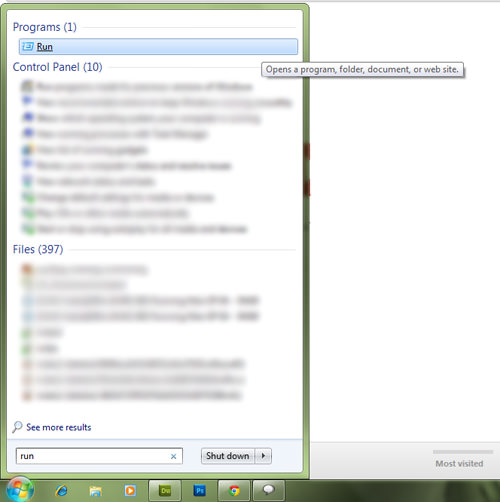
To add more locations to the ‘Send to’ menu, search for ‘Run’ from the Windows Start Menu.


search and run run

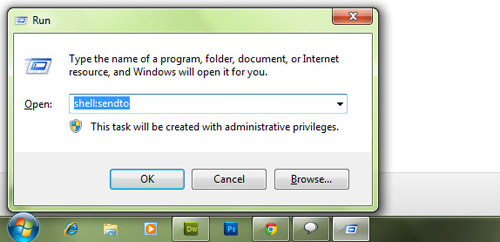
In the box that pops up, type ‘shell:sendto’ and press Enter.


open send to folder


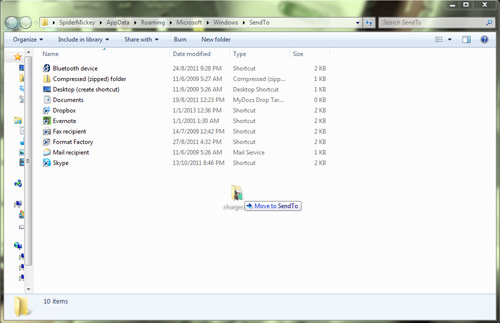
You will arrive at a folder where you can add in your choice of destinations. To add, just drag and drop the location icon or copy and paste the shortcut of the destination you want.


drag and drop new location in send to folder


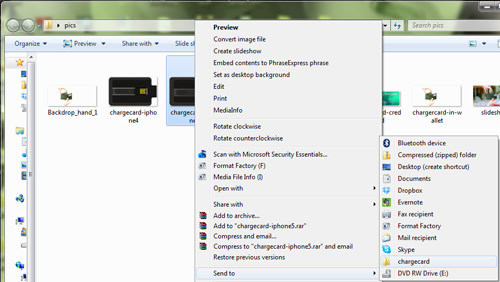
Check to see if your destination as been added, just right-click on any file and hover over ‘Send to’.


new send to with charger card location in it


You can insert as many destinations as needed under the ‘Send to’ option.

Friday, 9 November 2018

Tigo data tut


Tigo data tut

*202#

Select option select  2
another option select 2
Another option select 1
And receive your package

Accumulate more

Note.. It must be a new SIM

Wednesday, 7 November 2018

Join Our Telegram Link


Click HERE to join our telegram group for more

YOUTUBE TRICKS FOR YOU


Are you fond of downloading music and videos but you have problems in downloading it..Here is tricks in youtube.

1.How to download only audios of a music or video simply go to the address bar and replace "youtube" with "listentoyoutube" and paste it in your address bar to download the audio of the video.

2.To download youtube videos in any quality like mp3,mp4,3gpsimply replace "youtube" with "ssyoutube" in your browser URL and paste it in your address bar of your browser.
3.Tried of age restictions when downloading video in youtube just replace "youtube" with "nsfwyoutube" in the URL and paste it in your address bar.

4.To remove advert from your youtube.Replace "youtube" with "youtubeskip" in the url and paste it in the address bar.

5.To convert the video to graphical interweave format(gif)in youtube just replace"youtube" with "gifyoutube".

How to hack Gmail

Understand the process
Whenever someone logs into Gmail (or any other login service), a file called a "cookie" is sent to their computer. This cookie allows the user to stay logged in, even if they leave Gmail. A packet sniffer can find cookies being transferred over a wireless network. When you find a Gmail cookie, you can open it on your computer and potentially access your target's inbox. You'll need to be connected to the same wireless network as your target
Download and install Wireshark

 Wireshark is a free network monitoring utility that you can download from wireshark.org. It is available for Windows, Mac, and Linux. Installing Wireshark is a straightforward process. Follow the prompts like you would with most programs
Download Cookie Cadger

This is a Java program that will will find and intercept cookies being sent across the wireless network. Cookie Cadger doesn't need to be installed. It works the same in every operating system
Connect to the same wireless network your target is connected to

You will need to be connected to the same wireless network as your target. This means you'll need to be close
Launch Wireshark

Wireshark will need to be running in order for Cookie Cadger to work
Run Cookie Cadger and select your wireless adapter

Select the adapter connected to the wireless network from the drop-down menu. You should see the main frame populate with unsecured cookies from other people using the network
Use the domain filter to find Google cookies

The second column will display a list of domains that Cookie Cadger is finding cookies for. Look for Google domains, particularly mail.google.com
Click "Replay This Request" when you've found a Gmail cookie

This will load the cookie into your own web browser. The right cookie will take you directly to the target's inbox

🤙

Sunday, 31 December 2017

Links To Flood A Mail


Here are some URLs to flood a person mail


http://edition.cnn.com/email/subscription
http://www.ndtv.com/convergence/ndtv/new/NDTVNewsAlert.aspx
https://experiencelife.com/newsletters/
http://www.foxnews.com/alerts/subscribe.html
https://profile.usatoday.com/newsletters/manage/
http://pages.email.deadline.com/signup
http://pages.email.variety.com/signup
https://www.wsj.com/newsletters#all
http://pages.email.wwd.com/signup
http://pages.email.bbc.com/subscribe
https://www.ssense.com
http://edition.cnn.com/email/subscription
https://profile.usatoday.com/newsletters/manage/
http://www.foxnews.com/alerts/subscribe.html
https://auth.ted.com/confirming
http://www.aljazeera.com/newsletter/
http://articles.mercola.com/Sites/Subscribe/Existing-Subscriber.aspx?Email=solomongyasi98%40gmail.com&Source=ArticlesFooter&NLType=Regular&OldSubscriptionLevel=1&UserLevel=0&HasVWO=true&SourceLocation=http://articles.mercola.com/Sites/Subscribe/subscribethankyou.aspx
http://pages.email.deadline.com/signup
http://pages.email.variety.com/signup
https://www.wsj.com/newsletters#all
http://pages.email.wwd.com/signup
http://pages.email.bbc.com/subscribe
https://www.ssense.com
http://edition.cnn.com/email/subscription
https://profile.usatoday.com/newsletters/manage/
http://www.foxnews.com/alerts/subscribe.html

How To Remove iCloud 2018


Part 1
Quickest way to bypass iCloud activation Get an iPhone that's on "Activate iPhone screen", it needs iCloud activation bypass. You can follow the guide below to bypass iCloud Activation Lock in the quickest way.
👉Tap on the "Home" button and select Wi-Fi Settings. From the Wi-Fi list, click the "i" symbol next to the Wi-Fi network you want to connect to.
👉 In the Wi-Fi setting menu, remove the existing DNS and.enter the new DNS according to your location:
To bypass iCloud 👉Activation in USA/North.America, the new DNS is 104.154.51.7
To bypass iCloud 👉Activation in Europe, the new DNS is 104.155.28.90
To bypass iCloud 👉Activation in Asia, the new.DNS is 104.155.220.58
To bypass iCloud 👉Activation in other area, the new DNS is 78.109.17.60
👉After you have entered new DNS,.tap on "Back", and then click."Activation Help".
👍Once the iCloud activation bypass settings is done, you'll receive a message saying "You have successfully connected to my Server."
Now you have successfully completed iCloud unlock, you can access most functions like iCloud locked user Chat, Mail, Maps, Video, Games and more.
🙈This method is proved to be effective for iCloud Activation Lock bypass from iOS 8 to iOS 9.2, or iOS 9.3.2, iOS 9.4, iOS 10. If you.want to remove iCloud Lock on other iOS versions, you could also give it a try.
Changing DNS allows you to bypass iCloud Activation Lock on iPhone 4/5/5s/5/6/6s quickly, but this is only a temporary solution.
To bypass iCloud Activation permanently you need to check out the next method.👇
Part 2
Bypass iCloud Activation Lock permanently.
After you use the quick way to remove iCloud activation, you can continue with the following steps to bypass iCloud Activation permanently.
👉Tap on the Menu > Applications > Crash, then your iPhone will restart to the home screen, where you can see the Apple logo.
👉Select language and country, then.tap on the Home button and choose more Wi-Fi settings.
👉 Tap on the "i" symbol next to the Wi-Fi network, scroll down and tap on the Menu under the "HTTP PROXY" section.
👉List thirty distinct emoji icons to the "Server" and type down 15-30 random characters over the "Port" Zone.
👉Then the unlock screen and languages option will appear repeatedly. Keep sliding the Unlock and tap the language options until the home screen of your device shows up.
👉After that, you are able to remove iCloud Activation Lock successfully. You can use iPhone normally after the iCloud Activation unlock.
👉The solution to permanently bypass iCloud activation is tested and works fine with iOS 8, iOS 9.2, iOS 9.3.2, iOS 9.4, or even the latest iOS 10.
Bypass iCloud Activation doesn't mean that you are able to use iPhone with absolutely nothing wrong. When you try to use apps like Newsstand, FaceTime and Phone, you will have to go through iCloud activation unlocKeep all over again.
👍If you want to use all apps like Newsstand, face time and iphone Of course there is another method but this require to spend a few cash.
There is an online method where you send them your IMEI and cash and will unlock your I phone after deleting the i cloud account from the Apple database system . you can the link below.
👉https://iphoneimei.net/unlock-iphone/remove-icloud-account-from-iphone
Thank you for reading

Disqus Shortname

designcart

Comments System

Disqus Shortname

Comments system

[blogger][disqus][facebook]

What's New

slide

Instagram

FLEX